
Store products
lifetime and yearly Pro.
The app sells two things: a one-time lifetime Pro and a yearly subscription. You create them in App Store Connect and Google Play, then give the app their ids.
01What Pro unlocks
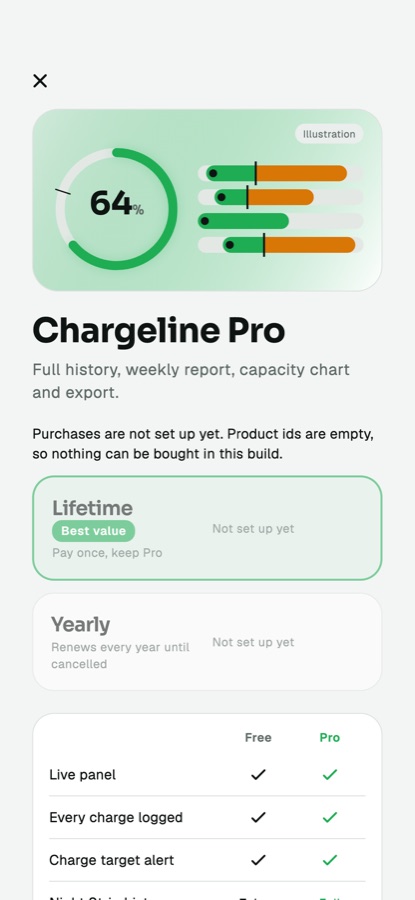
In the code, Pro gates the weekly report with its Monday reminder, the capacity chart, CSV export and history beyond the free days (default 7). Free users keep logging, the Live panel, the Night Strip, the charge alert and Learn. The paywall offers lifetime, yearly and Restore purchases.
No product ids are included. With empty ids the paywall says purchases are not set up yet and Pro cannot be unlocked: it never fakes a purchase. If you do not want to sell Pro, set paywall.enabled to off in the console (App config: paywall) and everything is unlocked.
02App Store Connect
- Create the app record with your bundle id (My Apps, plus).
- Open the app, then Monetization. Create a non-consumable in-app purchase for the lifetime product. Choose a product id such as
pro_lifetime(you choose it; it cannot be reused later). - Create a subscription group and an auto-renewable yearly subscription in it, for example
pro_yearly. - Set prices, names and the review screenshot for each, and accept the Paid Apps agreement and banking/tax forms (Business section). Products stay unavailable until these are done.
- Add the product ids to the app (below).
- Test with a Sandbox tester account on a real iPhone before you submit.
03Google Play Console
- Create the app with your application id, and upload a first build to an internal test track (Play only lets you create products once a build with the billing permission is uploaded).
- Monetize, Products, In-app products: create the lifetime product (one-time) with an id such as
pro_lifetime. - Monetize, Subscriptions: create the yearly subscription with a base plan billed yearly, id such as
pro_yearly, and activate the base plan. - Set up a merchant (payments) profile if Play asks for one.
- Add testers (Settings, License testing) and test from the internal track.
The app calls completePurchase after a purchase, which makes the Play Billing library acknowledge it. Google refunds purchases that are not acknowledged within three days, so make sure you test one real purchase end to end.
04Where to put the ids
Choose one of two ways.
| Way | How |
|---|---|
| In the console (no new build) | Console, App config: paywall: fill Lifetime product id, iOS, Lifetime product id, Android, Yearly product id, iOS, Yearly product id, Android. They reach phones within about five minutes. Needs the server. |
| In the app code | app/lib/brand.dart: set lifetimeIos, lifetimeAndroid, yearlyIos, yearlyAndroid. Used when no server config is reachable. |
Leave a product's id empty to not sell it on that platform; the paywall hides it.
05How yearly access is checked
On the device, a yearly subscription is trusted for 35 days after the last confirmation from the store and re-checked after 7 days. For harder protection turn on server verification (next page). Real store purchases were not exercised by the author because no product ids exist in the source: test them yourself before release.