
iOS Shortcuts
background logging on iPhone.
iOS never lets an app watch the battery in the background. Chargeline gets around this honestly: your users create four small automations in the Shortcuts app, and each one tells Chargeline what just happened.
01Why this is needed
An iPhone app cannot run while it is closed and watch charging. Apple does allow the user's own Shortcuts automations to run when the charger is connected. Chargeline provides an action, Log Charge Event (an App Intent in app/ios/Runner/LogChargeEventIntent.swift), that automations can call. It runs without opening the app, writes one event to a log file, and the app imports it next time it opens. Chargeline cannot create the automations for the user.
The action needs iOS 17.2 or newer (taken from the built app's App Intents metadata). Users on older iOS can still open the app and see the Live panel, but the Night Strip will stay empty.
02What your users do
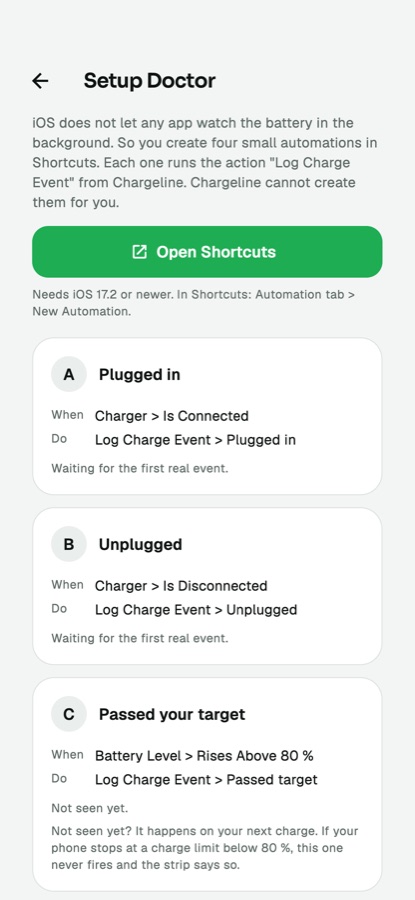
The app has a guided screen for this: Settings, Setup Doctor. It lists the automations below, has an Open Shortcuts button, and ticks each one when its first real event arrives.
| Automation | When | Do | |
|---|---|---|---|
| A | Plugged in | Charger, Is Connected | Log Charge Event, Plugged in |
| B | Unplugged | Charger, Is Disconnected | Log Charge Event, Unplugged |
| C | Passed your target | Battery Level, Rises Above (the target %) | Log Charge Event, Passed target |
| D (optional) | Low Power Mode | Low Power Mode, Is Turned On | Log Charge Event, Low Power Mode on |
- Open Shortcuts, tab Automation, tap New Automation.
- Pick the trigger from the table (for example Charger, then Is Connected).
- Add the action Log Charge Event (search for it) and choose the event.
- Set Run Immediately, not "Run After Confirmation", and turn Notify When Run off.
- Do one real plug-in and unplug. The ticks in Setup Doctor turn green when events arrive.
Until A and B have both arrived the Night Strip stays empty: it never shows sample data. If the phone stops charging at a limit lower than the target, automation C never fires and the strip says so.
03Honest limits
- If iOS gives no battery reading to a background action, only the event is logged and no percent is stored.
- Showing "Shortcuts lists the action and runs it with Run Immediately" on every iPhone model and iOS version has not been verified on a real device by the author. Test on your own iPhone before you publish and write your listing accordingly.
- Describe this in your store listing as "set up four automations in Shortcuts", not as automatic background tracking.